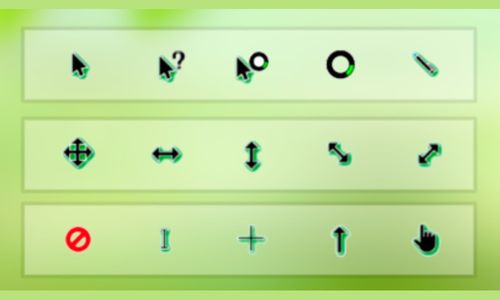
CarbonFiberGTV 鼠标指针皮肤封面

全部光标状态

Windows · 共 17 个状态 · 12 个动态

CarbonFiberGTV Windows 正常选择光标
正常选择
CarbonFiberGTV Windows 后台运行光标
后台运行
CarbonFiberGTV Windows 帮助选择光标
帮助选择
CarbonFiberGTV Windows 忙光标
忙
CarbonFiberGTV Windows 精确选择光标
精确选择
CarbonFiberGTV Windows 文本选择光标
文本选择
CarbonFiberGTV Windows 手写光标
手写
CarbonFiberGTV Windows 不可用光标
不可用
CarbonFiberGTV Windows 垂直调整大小光标
垂直调整大小
CarbonFiberGTV Windows 水平调整大小光标
水平调整大小
CarbonFiberGTV Windows 沿对角线调整大小1光标
沿对角线调整大小1
CarbonFiberGTV Windows 沿对角线调整大小2光标
沿对角线调整大小2
CarbonFiberGTV Windows 移动光标
移动
CarbonFiberGTV Windows 候选光标
候选
CarbonFiberGTV Windows 链接选择光标
链接选择
CarbonFiberGTV Windows 位置选择光标
位置选择
CarbonFiberGTV Windows 个人选择光标
个人选择

macOS · 共 12 个状态 · 10 个动态

CarbonFiberGTV macOS 正常选择光标
正常选择
CarbonFiberGTV macOS 帮助选择光标
帮助选择
CarbonFiberGTV macOS 不可用光标
不可用
CarbonFiberGTV macOS 忙光标
忙
CarbonFiberGTV macOS 精确选择光标
精确选择
CarbonFiberGTV macOS 文本选择光标
文本选择
CarbonFiberGTV macOS 移动光标
移动
CarbonFiberGTV macOS 链接选择光标
链接选择
CarbonFiberGTV macOS 沿对角线调整大小1光标
沿对角线调整大小1
CarbonFiberGTV macOS 沿对角线调整大小2光标
沿对角线调整大小2
CarbonFiberGTV macOS 垂直调整大小光标
垂直调整大小
CarbonFiberGTV macOS 水平调整大小光标
水平调整大小

关于「CarbonFiberGTV」

深灰箭头结合银色折面与纤维纹理,呈现棱角分明的金属质感。方向符号沿用深浅灰配色,适合低调的科技风桌面。

「CarbonFiberGTV」是创作者 静静 发布的一套鼠标光标皮肤,2026 年 11 月上架,属于「简约」分类,已被下载 3 次。整套包含 17 个 Windows 光标状态(正常选择、后台运行、帮助选择、忙、精确选择等)和 12 个 macOS 光标状态,其中 12 个是动态光标。用光标精灵客户端可以一键把它安装成系统光标,不想用了也能一键还原成系统默认。开通光标精灵会员后即可下载使用。

怎么安装这套光标

  1. 下载并打开光标精灵客户端(Windows 10+ / macOS 11+)。
  2. 在客户端的光标库里搜索「CarbonFiberGTV」。
  3. 点「安装」,系统光标就换成了「CarbonFiberGTV」;想换回来,点「还原默认」。

相似的光标